When a customer writes in about a failed payment, the logs either answer the question in a minute or they don’t answer it at all. Whether they do is mostly decided long before the incident: which level each line has, whether a line carries the order id, whether the output can be searched, and whether all of it ends up in one place.
This post builds that setup on a small order service, step by step. The whole thing is in a public repo, huseyinbabal/spring-boot-logging-grafana-loki, so you can run every command below yourself.
What this setup gives you
| Piece | What it does here |
|---|---|
| Log levels | five levels from TRACE to ERROR; the app’s level decides which lines get written at all |
| SLF4J + Logback | the API your code calls, and the engine Spring Boot configures for you |
logging.structured.format.console | one property turns every line into JSON |
Actuator /actuator/loggers | change a level at runtime, no restart |
| Grafana Alloy | finds the containers, reads their stdout, sends the lines to Loki |
| Loki + Grafana | stores the lines; one LogQL query finds the error and its stack trace |
Setup
| Part | Version |
|---|---|
| Spring Boot | 4.1.1 |
| Java | 25 |
| Grafana Alloy | 1.20.1 |
| Loki | 3.7.8 |
| Grafana | 13.2.4 |
The app is a tiny orders service: create an order, read it back, pay for it. A fake payment client makes order ids ending in 3 time out once and order ids ending in 7 fail. Ids start at 41, so the seventh order, 47, is the one that fails.
git clone https://github.com/huseyinbabal/spring-boot-logging-grafana-loki.git
cd spring-boot-logging-grafana-loki
docker compose up -d 2>&1 | grep Started
Container logging-demo-loki-1 Started
Container logging-demo-orders-1 Started
Container logging-demo-alloy-1 Started
Container logging-demo-grafana-1 StartedoutputSeven orders, then seven payments:
for item in book pen lamp mug desk chair bag; do curl -s -X POST "localhost:8080/orders?item=$item"; echo; done
for id in $(seq 41 47); do echo "$id $(curl -s -X POST localhost:8080/orders/$id/pay)"; done
41 paid
42 paid
43 paid
44 paid
45 paid
46 paid
47 payment failedoutputPick the level by who reads the line
A log line is one event: a timestamp, a level, the logger that wrote it, and a message. The level is the part people get wrong most often, so here is how this app uses each one:
| Level | When to use it | Line from this app |
|---|---|---|
| TRACE | step-by-step flow, method arguments | create called with item=book |
| DEBUG | what a developer needs while hunting a bug | cache hit for order 41 |
| INFO | normal business events | order 42 created for item pen |
| WARN | something went wrong and the app handled it | payment provider timed out for order 43, retrying (attempt 2 of 3) |
| ERROR | the request failed and someone should look | payment failed for order 47 |
The level you set for the app is a threshold. At INFO, the INFO, WARN and ERROR lines are written and TRACE and DEBUG lines are dropped before they are ever formatted. Spring Boot’s logging.level also accepts FATAL (Logback has no FATAL level, so it maps to ERROR) and OFF.
A useful test for the boundary between INFO and DEBUG: would someone on call want this line at 3 am without changing any setting? If yes, it’s INFO. If it only helps once you’re already digging, it’s DEBUG.
SLF4J is the API, Logback does the work
Your code talks to SLF4J. Behind it, Logback formats and writes the lines, and Spring Boot configures Logback for you, so there is no logback.xml in this project.
sed -n '16p;26,40p;48,49p' OrderController.java private static final Logger log = LoggerFactory.getLogger(OrderController.class);
@PostMapping
public Map<String, Object> create(@RequestParam String item) {
log.trace("create called with item={}", item);
long id = ids.incrementAndGet();
cache.put(id, item);
log.info("order {} created for item {}", id, item);
return Map.of("id", id, "item", item);
}
@GetMapping("/{id}")
public ResponseEntity<String> get(@PathVariable long id) {
String item = cache.get(id);
log.debug("cache {} for order {}", item != null ? "hit" : "miss", id);
return item != null ? ResponseEntity.ok(item) : ResponseEntity.notFound().build();
}
} catch (IllegalStateException e) {
log.error("payment failed for order {}", id, e);Two habits in this code matter more than they look:
- Placeholders, not string concatenation. With
{}, Logback builds the message only if the level is enabled."order " + id + " created"builds the string every time, even when the line is dropped. - The exception goes last. In
log.error("payment failed for order {}", id, e), SLF4J sees one placeholder and two arguments, treats the trailingThrowableas the exception, and prints its stack trace. Withoute, you get the message and lose the reason.
Levels go in application.yml, one for the root logger and one for your own package:
cat application.ymlspring:
application:
name: orders
logging:
level:
root: INFO
dev.huseyincodes.orders: INFO
structured:
format:
console: logstash
management:
endpoints:
web:
exposure:
include: health,loggersJSON logs with one property
logging.structured.format.console: logstash is all it takes. Spring Boot ships three structured formats, ecs (Elastic Common Schema), gelf (Graylog) and logstash, and needs no extra dependency for any of them.
docker compose logs --no-log-prefix orders | grep 'order 42 created' | jq .{
"@timestamp": "2026-10-19T13:18:51.50895363Z",
"@version": "1",
"message": "order 42 created for item pen",
"logger_name": "dev.huseyincodes.orders.OrderController",
"thread_name": "http-nio-8080-exec-5",
"level": "INFO",
"level_value": 20000
}Every field is now a key a tool can filter on. When an exception is logged, it arrives as a stack_trace field on the same line, so the trace can’t get split into separate lines on the way to your log store, which is what happens with multi-line plain text.
Change the level at runtime
Actuator’s loggers endpoint (exposed in the management block above) reads and changes levels while the app runs:
curl -s localhost:8080/actuator/loggers/dev.huseyincodes.orders; echo{"configuredLevel":"INFO","effectiveLevel":"INFO"}outputcurl -s -o /dev/null -w '%{http_code}\n' -X POST localhost:8080/actuator/loggers/dev.huseyincodes.orders \
-H 'Content-Type: application/json' -d '{"configuredLevel":"DEBUG"}'204outputThe next requests already log at DEBUG:
curl -s localhost:8080/orders/41 -o /dev/null; curl -s localhost:8080/orders/99 -o /dev/null
docker compose logs --no-log-prefix --since 10s orders | jq -r '.level + "  " + .message'
DEBUG cache hit for order 41
DEBUG cache miss for order 99outputThe same works for ROOT. Setting it to WARN makes the whole app write only warnings and errors:
curl -s -o /dev/null -w '%{http_code}\n' -X POST localhost:8080/actuator/loggers/ROOT \
  -H 'Content-Type: application/json' -d '{"configuredLevel":"WARN"}'
curl -s localhost:8080/actuator/loggers/ROOT; echo
204
{"configuredLevel":"WARN","effectiveLevel":"WARN"}outputThe change lives in memory: a restart goes back to application.yml, and posting {"configuredLevel":null} clears it earlier. Since this endpoint can change how an app behaves, keep it behind the same protection as the rest of your management endpoints and off the public internet.
Getting the lines into one place
The app writes to standard output and nothing else. It doesn’t know where its logs end up, which is what lets the rest of the pipeline change without touching the app:
orders (stdout) → Docker (json-file) → Grafana Alloy → Loki → GrafanaAlloy is Grafana’s collector. Promtail, the agent most older Loki tutorials use, has been end of life since March 2, 2026, so a new setup should start on Alloy. The whole stack is four services:
grep -E '^ [a-z]+:|image:|build:|logging:' compose.yaml orders:
build: ./app
logging: "alloy"
alloy:
image: grafana/alloy:v1.20.1
loki:
image: grafana/loki:3.7.8
grafana:
image: grafana/grafana:13.2.4logging: "alloy" is a Docker label on the orders service. Alloy mounts the Docker socket and uses that label to decide which containers to read:
// 1. find containers that have the label logging=alloy
discovery.docker "containers" {
  host = "unix:///var/run/docker.sock"
  filter {
    name   = "label"
    values = ["logging=alloy"]
  }
}

// 2. turn the compose service name into an "app" label
discovery.relabel "containers" {
  targets = discovery.docker.containers.targets
  rule {
    source_labels = ["__meta_docker_container_label_com_docker_compose_service"]
    target_label  = "app"
  }
}

// 3. read their stdout and send it on
loki.source.docker "containers" {
  host       = "unix:///var/run/docker.sock"
  targets    = discovery.relabel.containers.output
  forward_to = [loki.write.local.receiver]
}

// 4. push to Loki
loki.write "local" {
  endpoint {
    url = "http://loki:3100/loki/api/v1/push"
  }
}
Step 2 is the one to understand. Loki indexes labels, not the text of the lines. app="orders" is a good label because it has few possible values. An order id would be a bad one: every new id creates a new stream and the index grows with it. Keep ids in the message and search for them in the query.
Grafana gets Loki as its default data source from grafana/datasources.yaml, so there is nothing to click through on first start.
Finding the failed payment
Open http://localhost:3000, go to Explore, and work from wide to narrow:
{app="orders"}                              every line from the orders app
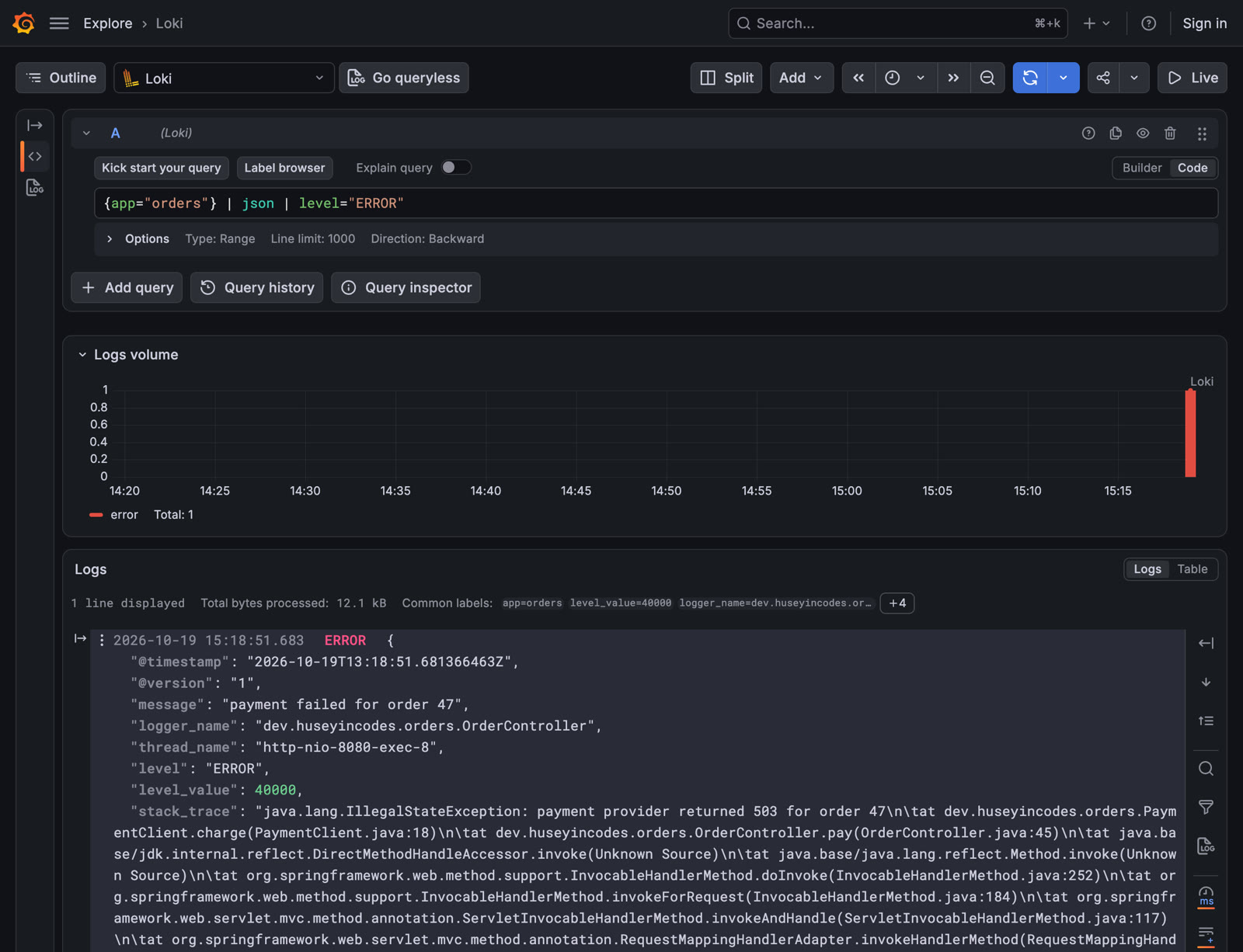
{app="orders"} | json | level="ERROR"       parse the JSON, keep only the errors
{app="orders"} |= "order 47"                everything that happened to order 47
The second query returns one line: the failed payment, with stack_trace pointing at PaymentClient.charge and the 503 from the provider.
The third one is the view you want when a customer names an order: the line where order 47 was created, then the line where its payment failed, in order.
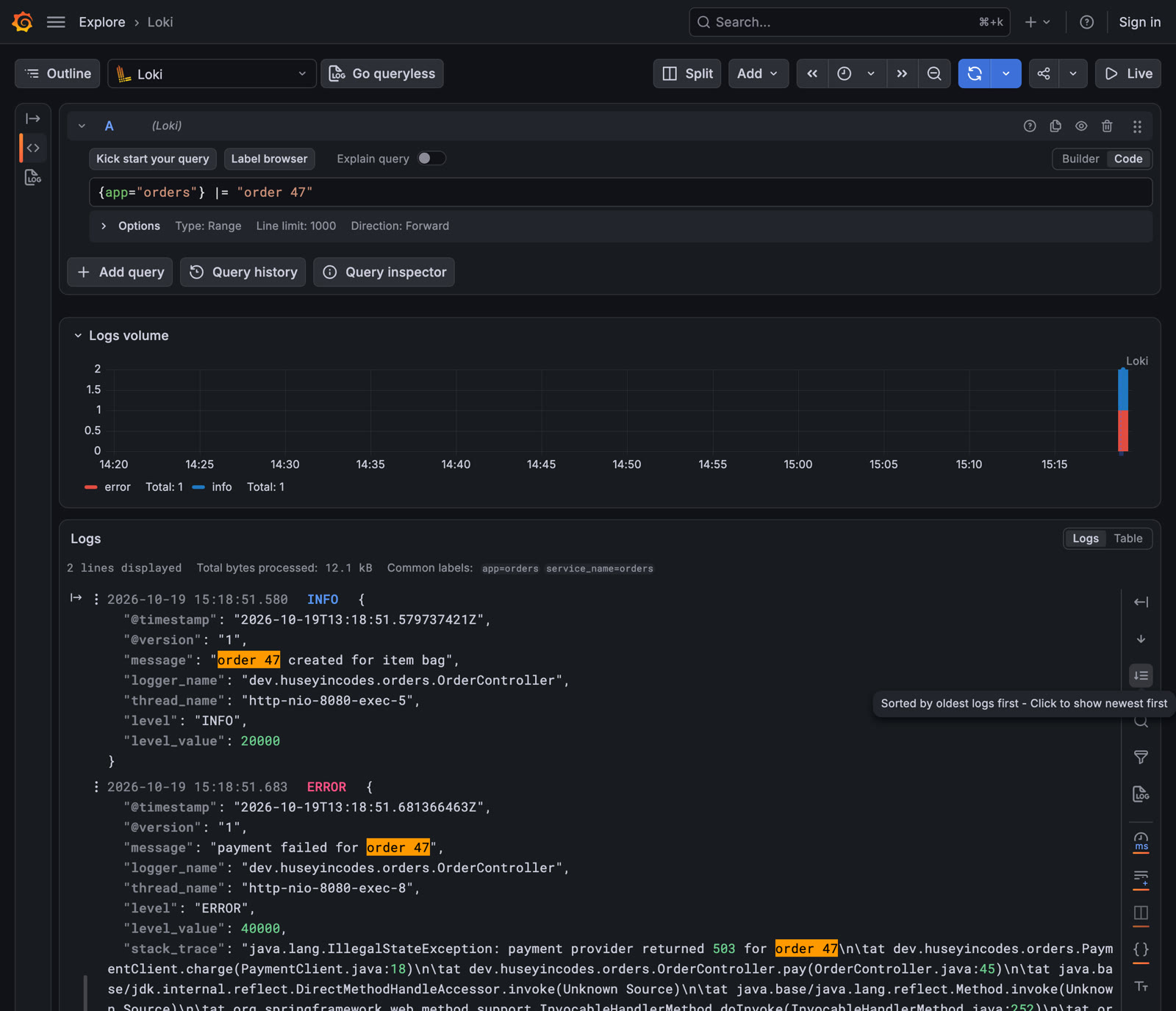
| json parses each line at query time, which is why fields like level and logger_name can be filtered even though they were never labels. |= is a plain substring match on the raw line.
What to take into your own app
- Choose levels by who reads the line: INFO for the on-call person, DEBUG for whoever is debugging.
- Put the id the customer will quote (order, user, payment) in the message, and pass the exception as the last argument.
- Turn on structured logging. One property, no dependency.
- Expose
loggersto the people who operate the app so they can raise a level for a few minutes instead of redeploying. - Write to stdout and let a collector ship it. Keep labels few and stable.
Clean up
docker compose down